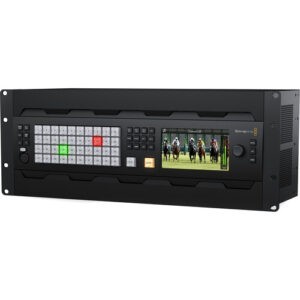
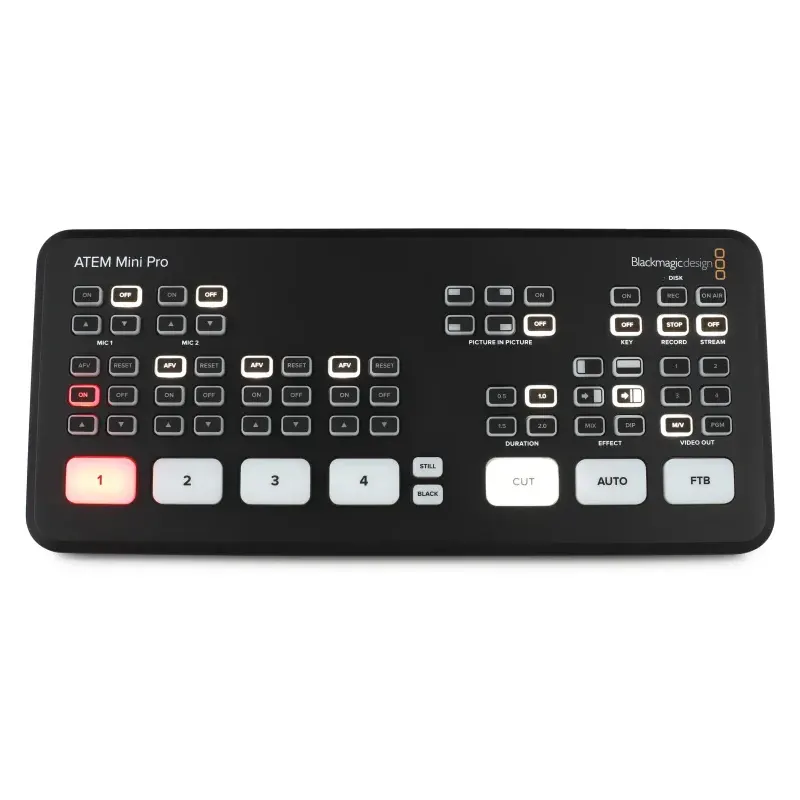
Blackmagic Design ATEM Mini Pro HDMI Video Production Studio with Livestreaming
$75.00
Description
Producing a polished multicamera livestream should not require a truckload of broadcast equipment. The Blackmagic Design ATEM Mini Pro brings professional live switching, streaming, recording, graphics, audio control, and monitoring into one compact production switcher.
Available from us as a rental product rather than a retail purchase, the ATEM Mini Pro is an excellent choice for productions that need dependable video switching without the size, complexity, or cost of a full broadcast control room. It can combine feeds from cameras, laptops, presentation systems, and other HDMI sources, allowing an operator to create a professional program in real time.
From interviews and panel discussions to corporate webcasts, training sessions, virtual events, product demonstrations, podcasts, and online presentations, the ATEM Mini Pro provides a practical foundation for a wide range of live video workflows.
Our role as an AV rental and production company goes beyond handing over a switcher in a case. We can help you determine whether the ATEM Mini Pro is the right fit, select compatible cameras and accessories, plan signal flow, configure the production workflow, and provide technical support or a complete production team when needed.
What Is the Blackmagic Design ATEM Mini Pro?
The ATEM Mini Pro is a compact live production switcher designed to manage up to four HDMI video sources. An operator can connect cameras, computers, presentation laptops, gaming systems, media players, or other compatible HDMI devices and switch between them during a live production.
Unlike a basic HDMI selector, the ATEM Mini Pro is built for creative production. It supports professional transitions, picture-in-picture layouts, chroma keying, graphic overlays, audio mixing, multiview monitoring, direct network streaming, USB webcam output, and H.264 program recording.
Blackmagic Design specifies four standards-converted HDMI inputs, one HDMI output, two 3.5 mm stereo audio inputs, Ethernet connectivity, and a USB-C connection that can be used for recording, webcam output, software control, and updates. Each HDMI input includes frame-rate conversion and re-synchronization, making it easier to work with sources that do not initially share identical video settings.
This combination makes the switcher especially useful for compact productions where portability matters but the final program still needs to look intentional, organized, and professional.
Why Rent the ATEM Mini Pro for Your Production?
Renting the ATEM Mini Pro gives you access to a professional video production tool only when your project requires it. There is no need to purchase equipment that may spend most of the year sitting unused, and you do not have to manage long-term storage, firmware maintenance, troubleshooting, or accessory compatibility on your own.
More importantly, renting from an experienced production company helps reduce uncertainty. A video switcher is only one part of a successful livestream. Cameras, HDMI cables, converters, audio sources, monitors, recording drives, networking equipment, lighting, and streaming platforms must all work together.
Depending on your production, we can pair the ATEM Mini Pro with suitable cameras, presentation computers, microphones, audio mixers, confidence monitors, displays, network equipment, recording media, and other AV components. The result is a complete workflow designed around your event rather than a collection of unrelated devices.
A Cost-Effective Choice for Short-Term Events
The ATEM Mini Pro is ideal when you need professional switching for a conference, webcast, interview, presentation, internal meeting, training program, or limited production run. Renting allows you to match the equipment to the scale of each event instead of committing to one permanent system.
Professionally Checked Before the Event
Rental equipment should arrive ready to work. Our team checks the switcher, power supply, connections, control functions, and relevant accessories before dispatch or installation. When the production includes additional equipment, we can also test the broader signal chain in advance.
Flexible Production Support
Some clients need equipment only. Others need setup assistance, remote guidance, an on-site technician, a livestream operator, or complete production management. The ATEM Mini Pro rental can be incorporated into different service levels based on your team’s technical experience and the importance of the broadcast.
Four HDMI Inputs for Multicamera Live Video Production
The ATEM Mini Pro includes four HDMI inputs, allowing a small production team to build a surprisingly capable multicamera setup.
A typical configuration might include:
- Camera 1 for a wide shot of the stage, set, or interview area
- Camera 2 for a close-up of the primary speaker
- Camera 3 for a guest, product shot, or alternate angle
- Input 4 for a presentation laptop, video playback system, or graphics computer
Each source can be selected directly from the front control panel. Large illuminated input buttons make it easy to see which source is currently on air, while cut and auto-transition controls let the operator move between sources cleanly.
Because all four HDMI inputs include standards conversion and re-synchronization, the switcher can accommodate several supported HD frame rates and formats without requiring every source to be perfectly matched before connection. The system supports HD input and streaming formats up to 1080p60; it does not support Ultra HD or 4K program production.
Direct Livestreaming Through Ethernet
One of the most useful features of the ATEM Mini Pro is its built-in hardware streaming engine. The switcher can encode the finished program and stream it through its Ethernet connection, reducing dependence on a separate computer-based encoder.
This creates a cleaner workflow for compatible streaming platforms. Cameras and presentation sources enter the ATEM Mini Pro, the operator switches the show in real time, and the finished program is encoded for delivery over the network.
Current Blackmagic Design documentation lists direct streaming support using RTMP and SRT over Ethernet or through a shared internet connection over USB-C.
For mission-critical broadcasts, however, a dependable network connection remains essential. The switcher can encode and deliver the program, but livestream reliability also depends on available upload bandwidth, network stability, platform settings, account permissions, and properly configured stream credentials.
USB Webcam Output for Zoom, Microsoft Teams, and Web Platforms
The ATEM Mini Pro can also send its switched program to a computer through USB-C as a webcam source. To compatible software, the professional multicamera program appears much like a conventional USB camera.
This makes the switcher useful for productions delivered through conferencing, webinar, recording, and browser-based communication platforms. Instead of presenting viewers with one static webcam angle, your program can include multiple cameras, presentation slides, graphics, picture-in-picture layouts, and professionally controlled audio.
A common workflow is to connect several HDMI cameras and a presentation laptop to the ATEM Mini Pro, create the program on the switcher, and send the result to a host computer running the selected meeting or webinar platform.
This approach can significantly improve virtual presentations, executive communications, remote training, product launches, panel discussions, and hybrid meetings without forcing the platform itself to manage every camera independently.
Record the Finished Program to USB Media
The ATEM Mini Pro can record the finished program directly to compatible external USB storage. Recording is performed in H.264 with AAC audio at the selected ATEM video standard, producing a compressed program file suitable for review, archiving, delivery, or further editing. Blackmagic lists support for ExFAT and HFS+ formatted media.
Direct program recording is useful when you need:
- A backup copy of a livestream
- A recording of a presentation or meeting
- Fast delivery of a finished event video
- An archive for internal communication or compliance
- Content that can later be repurposed into shorter clips
It is important to understand that the standard ATEM Mini Pro records the switched program, not isolated recordings of all four HDMI inputs. If your production requires every camera to be recorded separately for detailed post-production editing, an ISO-capable switcher or a separate recording workflow may be more appropriate.
Our production team can help determine which recording approach best suits your project before the rental is confirmed.
Professional Multiview Monitoring on One Display
Live switching is much easier when the operator can see every source at once. The ATEM Mini Pro provides a multiview output that can display the four HDMI inputs along with program, preview, media, recording status, streaming status, and audio meters on a single connected monitor.
Blackmagic describes the multiview as a ten-view layout with configurable program and preview windows, four input views, media-player monitoring, streaming and recording information, and audio meters.
This consolidated view gives the operator a practical production dashboard. Before selecting a camera, the operator can confirm that the subject is framed correctly, the source is active, and the next shot is ready. Streaming and recording indicators provide additional reassurance that the program is being delivered and captured as expected.
For rental packages, a suitable production monitor can be added when the switcher will be operated from a dedicated control position.
Built-In Fairlight Audio Mixing and Processing
Good video attracts attention, but good audio keeps an audience engaged. The ATEM Mini Pro includes a Fairlight audio mixer capable of managing embedded HDMI audio and the two analog stereo inputs.
The mixer provides control over individual channels, including gain, audio-follow-video behavior, level monitoring, and professional processing. Blackmagic specifies a six-input, two-channel mixer with compressor, gate, limiter, six-band parametric equalization, master gain, and level and peak metering.
This makes it possible to balance audio from multiple cameras, presentation computers, playback devices, and compatible microphone sources within the production environment.
For simple programs, audio may be connected directly to the switcher. For larger events involving several wireless microphones, music playback, audience questions, remote callers, or room sound reinforcement, the ATEM Mini Pro can receive a prepared mix from a separate professional audio system.
Our AV production services can integrate video switching and audio mixing into one coordinated workflow, helping prevent common problems such as inconsistent levels, distorted inputs, muted presentations, or audio that falls out of sync with the picture.
Picture-in-Picture, Graphics, Transitions, and Chroma Key
The ATEM Mini Pro is compact, but its creative tools go well beyond simple cuts between cameras.
Picture-in-Picture Layouts
The built-in digital video effects system can create picture-in-picture compositions. A presenter can remain visible in a smaller window while slides, demonstrations, websites, or videos occupy the main frame.
This is especially effective for training, product demonstrations, financial presentations, software walkthroughs, educational content, and executive webcasts where both the speaker and supporting material need to remain visible.
Professional Video Transitions
The switcher supports cuts as well as automated transitions such as dissolves, dips, wipes, and DVE movements. Transition duration and behavior can be adjusted to match the tone of the production.
For most corporate and professional programs, clean cuts and subtle dissolves are usually the best choice. More stylized transitions can be used for entertainment, branded programs, or creative online content.
Green-Screen Chroma Keying
An advanced chroma keyer allows a subject filmed against a properly lit green or blue background to be composited over a graphic, presentation, video, or virtual environment.
Successful chroma keying still depends on production fundamentals. Even lighting, adequate distance between the subject and background, correct camera exposure, and a clean background surface are essential for convincing results.
Logos, Titles, and Still Graphics
The built-in media pool can store up to 20 still images for titles, logos, lower thirds, backgrounds, and other visual elements. Supported formats include common still-image types such as PNG, JPEG, TIFF, TGA, BMP, and GIF.
When transparent graphics are prepared correctly, they can be layered over the live program to create a more branded and broadcast-ready presentation.
ATEM Software Control for Advanced Production Management
The physical control panel covers the functions most operators need during a straightforward production. For deeper control, Blackmagic includes ATEM Software Control for Mac and Windows.
The software expands access to switching, graphics, transitions, keying, macros, media management, audio mixing, and switcher configuration. Multiple copies of the software can also be used on a production network, allowing different team members to manage separate responsibilities when the workflow requires it.
For example, one operator may handle camera switching while another adjusts audio, prepares graphics, or monitors media. This division of responsibilities can make a compact system feel much closer to a traditional production environment.
Best Uses for an ATEM Mini Pro Rental
Corporate Livestreams and Executive Communications
Use multiple cameras to create a polished company update, executive address, investor presentation, fireside chat, or internal broadcast. Presentation slides can be integrated alongside speaker shots, while branding and titles give the program a consistent visual identity.
Webinars and Training Programs
Switch between instructors, close-up demonstrations, presentation slides, prerecorded content, and remote communication platforms. Picture-in-picture layouts help viewers follow both the presenter and the learning material.
Interviews, Podcasts, and Panel Discussions
Connect individual camera angles for the host, guest, wide shot, and supporting content. The operator can follow the conversation naturally, creating a more engaging result than a single static camera.
Product Demonstrations
Combine a presenter shot, a close-up product camera, a computer screen, and a prerecorded video source. The ATEM Mini Pro makes it possible to move between those elements without interrupting the presentation.
Hybrid Meetings and Virtual Events
The switcher can create a professional program from cameras and presentation sources before sending it into a conferencing or streaming platform. This gives remote viewers a more intentional experience while supporting communication between physical and online audiences.
Educational and Instructional Content
Lecturers and instructors can switch between a teaching camera, demonstration area, document camera, computer presentation, and media playback source. The finished session can be streamed, recorded, or both.
Small Performances and Creative Productions
Musical performances, talk shows, community programs, creative broadcasts, and online entertainment can benefit from multicamera switching, graphic overlays, transitions, and integrated audio.
Blackmagic ATEM Mini Pro Technical Specifications
| Specification | ATEM Mini Pro Capability |
|---|---|
| Video inputs | 4 HDMI Type-A inputs with embedded audio |
| Input synchronization | Frame-rate conversion and re-synchronization on all four HDMI inputs |
| Maximum production format | HD up to 1080p60; no Ultra HD or 4K program support |
| HDMI output | 1 configurable HDMI program or multiview output |
| Analog audio inputs | 2 x 3.5 mm stereo mini-jack inputs |
| Audio mixer | 6-input, 2-channel Fairlight mixer with EQ, compression, gate, limiter, gain, and metering |
| Network connection | 10/100/1000 Base-T Ethernet for streaming, control, and updates |
| Computer interface | 1 x USB-C 3.1 Gen 1 |
| Webcam output | USB webcam-style program output for compatible computer applications |
| Direct recording | H.264 MP4 program recording with AAC audio to compatible USB media |
| Multiview | Ten-view monitoring layout with four inputs, program, preview, media, audio, streaming, and recording status |
| Media pool | Up to 20 still graphics |
| Creative tools | DVE picture-in-picture, transitions, upstream and downstream keying, chroma key, and graphic overlays |
| Control options | Built-in hardware panel and included ATEM Software Control |
| Power | External 12V power supply; approximately 30W power usage |
The specifications above are based on current Blackmagic Design documentation for the ATEM Mini Pro.
Rent the Blackmagic Design ATEM Mini Pro for Your Next Production
The Blackmagic Design ATEM Mini Pro offers an efficient way to create professional multicamera programs for livestreaming, webcasting, recording, webinars, interviews, presentations, training, and hybrid communication.
Its compact design makes it easy to deploy, while its four HDMI inputs, built-in streaming engine, webcam output, H.264 recording, multiview monitoring, Fairlight audio mixer, picture-in-picture effects, graphic support, and professional transitions provide the tools needed to produce a polished live program.
As an AV rental and production company, we can provide the ATEM Mini Pro as an equipment-only rental or incorporate it into a complete production package. Our team can assist with system design, equipment selection, camera and audio integration, network planning, setup, testing, operation, recording, and livestream delivery.
Contact our production team to check ATEM Mini Pro rental availability and discuss the right video, audio, streaming, and technical support package for your project.