
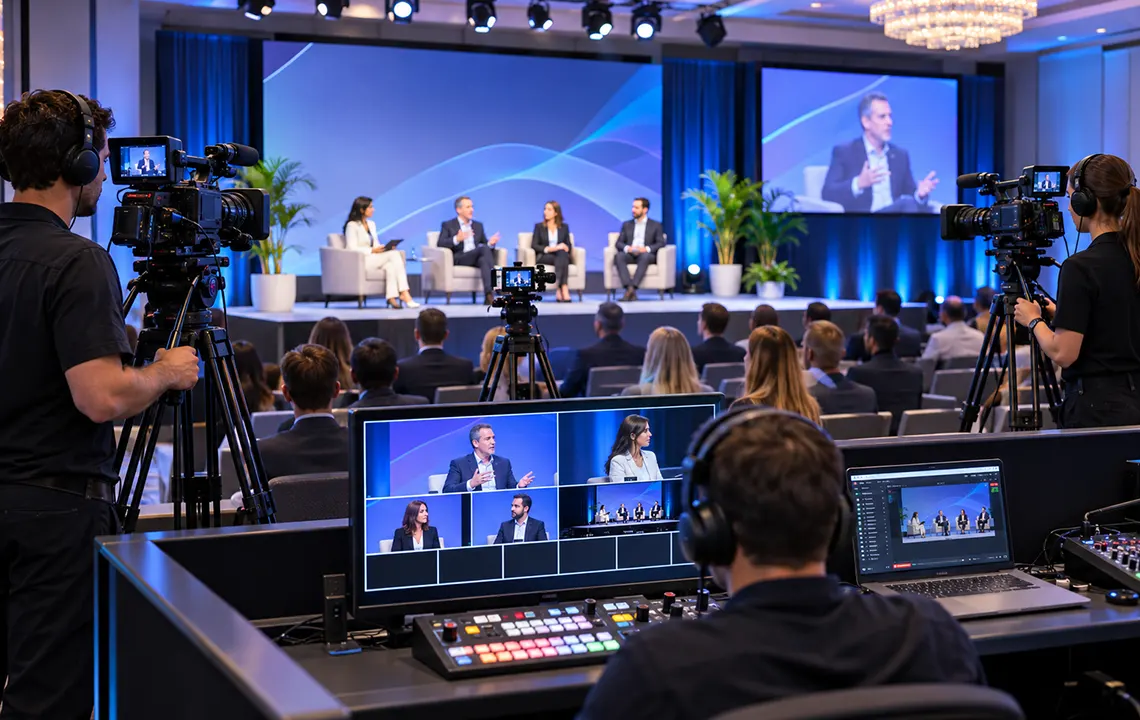
A multi-camera livestream can make a corporate event feel much more intentional to an online audience. Instead of watching one static angle for an entire session, viewers can see close-ups of speakers, wider stage views, panel reactions, demonstrations, audience questions, and presentation content at the right moments.
But more cameras do not automatically create a better broadcast. The real question is: how many cameras does your event actually need?
For some events, one carefully positioned camera is enough. For many conferences, keynotes, and corporate livestreams, two or three cameras provide much more flexibility. Complex productions may benefit from four or more cameras, but only when each camera has a clear job.
The right camera count depends on your program, stage layout, number of speakers, audience interaction, recording requirements, and the type of experience you want to create for remote viewers.
Start With the Event Program, Not the Number of Cameras
One of the easiest mistakes in livestream planning is starting with an equipment package.
“We want three cameras” sounds specific, but it does not explain what the cameras need to capture.
Instead, start with what will happen during the event.
Consider questions such as:
- Will there be one presenter or several?
- Will speakers remain behind a lectern or move around the stage?
- Are there panel discussions?
- Will audience members ask questions?
- Are there product demonstrations or physical activities?
- Does the stream need to show slides, videos, or other presentation content?
- Will remote presenters participate?
- Does the in-room audience also need IMAG, or live camera images displayed on venue screens?
- Will individual camera feeds be recorded for post-production?
The answers reveal what shots the production actually needs.
A one-hour presentation with one speaker standing in a predictable position may require very little camera coverage. A conference session that moves from a keynote to a six-person panel and then audience Q&A may need several different camera positions even though it takes place on the same stage.
That is why camera planning should be part of the overall event production process rather than an isolated equipment decision. Our event production service is designed around coordinating elements such as video, audio, lighting, staging, and technical operation as one system.
What Can You Do With One Camera?
A single-camera livestream is the simplest option.
It can work well for:
- A single presenter
- A small meeting
- A straightforward lecture
- A fixed interview setup
- A speaker who remains in one predictable area
- A stream where visual variety is not an important goal
The main advantage is simplicity. There are fewer camera signals to manage, less switching, potentially fewer operators, and fewer positions to accommodate in the venue.
However, a single camera has an important limitation: there is nowhere else to cut while the shot is being adjusted.
Suppose the presenter walks from the lectern to the opposite side of the stage. If the camera operator needs to pan, zoom, refocus, or completely reframe the shot, online viewers may see the entire adjustment.
A camera can also remain locked on a safe wide shot, but that creates a different compromise. The image may be technically reliable while leaving viewers with a distant view of the speaker for the entire presentation.
One camera can therefore be appropriate when simplicity is the priority, but it offers limited flexibility for producing a more polished live program.
What Changes When You Add a Second Camera?
Two cameras provide one of the biggest improvements in livestream flexibility because the director now has somewhere else to go.
A common two-camera configuration might use:
- Camera 1: A wide or medium-wide stage shot
- Camera 2: A tighter shot of the active presenter
While the livestream is showing the wide camera, the second operator can reframe a close-up. Once the close-up is ready, the director can switch to it. The wide camera can then make its next adjustment without viewers seeing that movement.
This creates cleaner transitions and makes it much easier to follow a presenter around the stage.
Two Cameras for Keynotes
For a keynote, one camera might maintain a reliable shot covering the main presentation area while another follows the speaker more closely.
That allows the director to alternate between context and detail instead of presenting the entire keynote from one perspective.
Two Cameras for Small Panels
Two cameras can also cover a small panel. One may show the full group while the second captures tighter shots.
The limitation appears when panelists are spread across a wide stage or speak rapidly back and forth. One tight camera may have to move frequently between participants, making it harder to prepare clean shots before each person begins speaking.
For a predictable two- or three-person discussion, that may be acceptable. For a larger or more dynamic panel, a third camera can make a significant difference.
Why Three Cameras Are a Strong Starting Point for Many Corporate Events
Three cameras often create enough flexibility to handle a much wider range of live event situations without making the production unnecessarily complicated.
A typical arrangement could be:
- Camera 1: Wide safety shot of the stage
- Camera 2: Tight presenter or panelist angle
- Camera 3: Secondary close-up, alternate stage angle, audience coverage, or another specialized shot
The exact roles should change according to the program.
Keynote Presentations
For a keynote, three cameras might provide:
- A wide view showing the stage and environment
- A medium or tight speaker shot
- A secondary angle that can follow movement or create visual variety
The wide shot also acts as a useful fallback while the other cameras reposition.
Panel Discussions
Panels are where a third camera becomes particularly valuable.
Imagine five executives seated across the stage.
One camera can hold the full panel. The other two can concentrate on different portions of the group or prepare close-ups of individual speakers.
When the conversation moves from one person to another, the director has more ready-to-use options. Operators can prepare their next shots while another camera remains live.
Audience Q&A
If audience participation is important, a third camera can sometimes be assigned to the room rather than the stage.
When an attendee asks a question, the stream can show that person instead of leaving viewers watching panelists while an unseen voice speaks from somewhere in the audience.
Whether that is practical depends on room layout, lighting, available aisles, and how audience microphones are managed.
When Does an Event Need Four or More Cameras?
Adding a fourth camera should solve a specific production need.
Four or more cameras can be useful when an event includes several distinct areas of activity or when the livestream is intended to feel more like a broadcast than simple documentation.
Examples include:
Large Panel Discussions
A wide panel can be difficult to cover efficiently with only one or two close-up cameras.
Additional cameras can divide the stage into zones so operators do not have to make large, visible movements between speakers.
Product Demonstrations
A product launch or technical demonstration may require several perspectives at the same time.
For example:
- A presenter camera
- A full-stage camera
- A close-up of the product
- An overhead or detail camera
The audience needs to understand both what the presenter is saying and what is physically happening.
Awards and Recognition Events
An awards program may benefit from separate cameras covering:
- The host
- Award recipients
- A wide stage view
- Audience reactions or walk-up shots
Without enough coverage, the production may repeatedly miss spontaneous moments because one camera is trying to serve too many purposes.
Performances and Entertainment
Live entertainment often benefits from additional angles because movement is less predictable and visual variety is part of the viewing experience.
A static conference presentation and a live performance should not be given the same camera plan simply because both happen on a stage.
Large Hybrid Events
A hybrid event may require one set of shots for the online audience while also feeding venue screens.
When cameras serve both livestream and IMAG requirements, placement and shot selection become more complicated. Our guide to IMAG for conferences explains how live cameras can support visibility for the in-room audience as well as other production requirements.
Camera Roles Matter More Than Camera Quantity
Before adding another camera, ask a simple question:
What shot will this camera provide that we cannot reliably get already?
Every camera should have a purpose.
Useful camera roles can include:
The Safety Wide
A wide camera provides dependable coverage of the main stage.
It may not always be the most exciting shot, but it is extremely useful during transitions, speaker changes, camera repositioning, or unexpected activity.
The Primary Speaker Camera
This camera follows the person currently presenting and usually provides medium or tight framing.
For many corporate streams, this will be one of the most frequently used shots.
The Secondary Tight Camera
A second close-up camera becomes valuable during panels, interviews, or programs involving several speakers.
While one tight camera is live, the other can find and frame the next speaker.
The Audience Camera
Audience shots can support Q&A sessions, reactions, applause, and interactions between presenters and attendees.
However, placing an audience camera only makes sense if the room layout and lighting allow it to produce useful images.
The Detail Camera
Demonstrations may need close-up coverage of products, equipment, experiments, documents, or hands-on activity.
A detail shot can sometimes be more important to the online audience than another traditional stage angle.
Manned Cameras, PTZ Cameras, or a Combination?
Camera count does not necessarily equal camera operator count.
PTZ cameras—pan-tilt-zoom cameras—can be controlled remotely and may be useful when physical space is limited or when placing an operator at every camera position is impractical.
A production might combine:
- Operator-controlled cameras for dynamic speaker coverage
- PTZ cameras for wide shots or predictable positions
- Fixed cameras for safety or specialized views
The right combination depends on how much movement the event requires.
A camera operator can respond naturally to spontaneous activity. A PTZ camera can provide efficient coverage from a position where another operator would be intrusive or difficult to accommodate.
Neither approach is automatically better. The goal is to match the camera system to the way the event actually behaves.
For more background on camera types and their roles in live production, see our camera rental guide.
Remember That Every Additional Camera Affects the Rest of the Production
Camera count should never be considered in isolation.
Adding a camera can affect several other parts of the livestream system.
Video Switching
Every camera needs to enter the production workflow so the director or switcher operator can preview and select it.
As the number of sources increases, the team may also be managing:
- Presentation computers
- Remote speakers
- Video playback
- Graphics
- Sponsor content
- Countdown or holding slides
A four-camera production can therefore involve considerably more than four video sources.
Monitoring
The video team needs to see incoming camera feeds and the final program output.
Good monitoring helps the director know which shots are ready before putting them live.
Communications
Camera operators may need communication with the director so they can receive instructions such as:
“Camera two, prepare the panelist on the left.”
Without clear communication, having more cameras can actually make the production less coordinated.
Cabling and Signal Distribution
Camera placement affects cable paths, safety, signal transmission, power, and available technical space.
A theoretically perfect camera angle is not useful if the camera blocks an audience aisle or cannot be connected reliably to video control.
Crew
Adding cameras can increase staffing requirements depending on whether they are operated, remotely controlled, or fixed.
The cost of another camera is therefore not simply the price of another camera body.
Audio, Slides, and Graphics Still Matter as Much as the Cameras
A beautiful four-camera stream with poor audio is still a poor livestream.
Camera planning needs to be coordinated with the rest of the program.
For example, if the presenter is discussing a detailed chart, the correct shot may not be a camera at all. The livestream might need to show the presentation feed directly, perhaps alongside a speaker image.
A polished production may switch among:
- Speaker cameras
- Full-screen slides
- Picture-in-picture layouts
- Videos
- Lower-third graphics
- Remote participants
- Audience cameras
The video director is therefore not simply choosing among cameras. The director is deciding what the online viewer needs to see at each moment.
Our webcasting and live streaming service addresses livestreaming as part of the larger production workflow rather than treating the camera feed as the complete stream.
Camera Count Should Reflect the Room Layout
The venue can significantly influence how many useful camera positions are actually available.
Before finalizing a camera plan, consider:
- Stage width and depth
- Audience seating layout
- Center aisles and side aisles
- Columns or architectural obstructions
- Ceiling height
- Camera platform locations
- Distance from cameras to the stage
- Lighting conditions
- Placement of projection screens or LED walls
- Emergency exits and accessible routes
A camera placed directly at floor level behind several rows of attendees may have its view blocked every time someone stands.
A close-up camera positioned too far from the stage may require a different lens.
A roaming camera may sound useful until the room layout reveals there is nowhere for the operator to move without distracting attendees.
These are exactly the kinds of issues that should be evaluated during an AV site survey.
How Recording Requirements Can Change the Camera Plan
Some organizations need more from the event than the live broadcast.
They may want to create:
- Edited keynote videos
- Social media clips
- Training content
- Promotional videos
- Speaker reels
- Internal communications
- On-demand sessions
In those situations, isolated camera recordings—often called ISO recordings—can provide more flexibility after the event.
Instead of having only the final switched program, editors may have access to individual camera feeds.
That does not necessarily mean you need more cameras, but it can change how cameras are assigned. A camera that rarely appears in the live program might still provide valuable footage for later editing.
Recording also introduces storage, monitoring, and redundancy considerations that should be planned before the event. Our corporate livestream backup planning guide discusses the difference between protecting the livestream itself and protecting important recordings.
A Practical Starting Point by Event Type
There is no universal formula, but the following ranges can be useful as planning starting points rather than fixed rules.
| Event Format | Possible Starting Point | Typical Reason |
|---|---|---|
| Single fixed presenter | 1–2 cameras | Basic coverage plus optional close-up flexibility |
| Corporate keynote | 2–3 cameras | Wide shot, speaker close-up, alternate angle |
| Interview or fireside chat | 2–3 cameras | Two individual shots plus optional two-shot |
| Small panel | 2–3 cameras | Full panel plus close-ups |
| Large panel | 3–4 cameras | Wide coverage and multiple prepared close-ups |
| Audience Q&A session | 3+ cameras | Stage coverage plus audience coverage |
| Product demonstration | 3–4+ cameras | Presenter, wide, detail, and specialty angles |
| Awards program | 3–4+ cameras | Host, recipients, wide stage, reactions |
| Performance or complex show | 4+ cameras | Multiple dynamic and specialized angles |
These numbers should not be treated as equipment packages. A well-designed two-camera production can be more effective than a poorly planned five-camera production.
So, How Many Cameras Does Your Event Need?
For a simple livestream with one predictable presenter, one camera may be enough.
Two cameras provide much more flexibility because one shot can remain live while the other is reframed.
Three cameras are a useful starting point for many corporate events involving keynotes, interviews, panels, or audience interaction because they allow a wide safety shot plus multiple prepared angles.
Four or more cameras become valuable when the event has several areas of activity, large panels, demonstrations, performances, extensive audience interaction, or a more broadcast-oriented production style.
The goal is not to use as many cameras as possible.
The goal is to have enough purposeful camera angles to cover the program smoothly without adding complexity that does not improve the viewer experience.
When planning a multi-camera livestream, we recommend evaluating the agenda, room layout, speaker movement, presentation content, audience interaction, recording needs, lighting, and streaming workflow together. Megahertz Productions can help translate those requirements into a camera and production plan that fits the event rather than forcing the event into a predefined equipment package.


