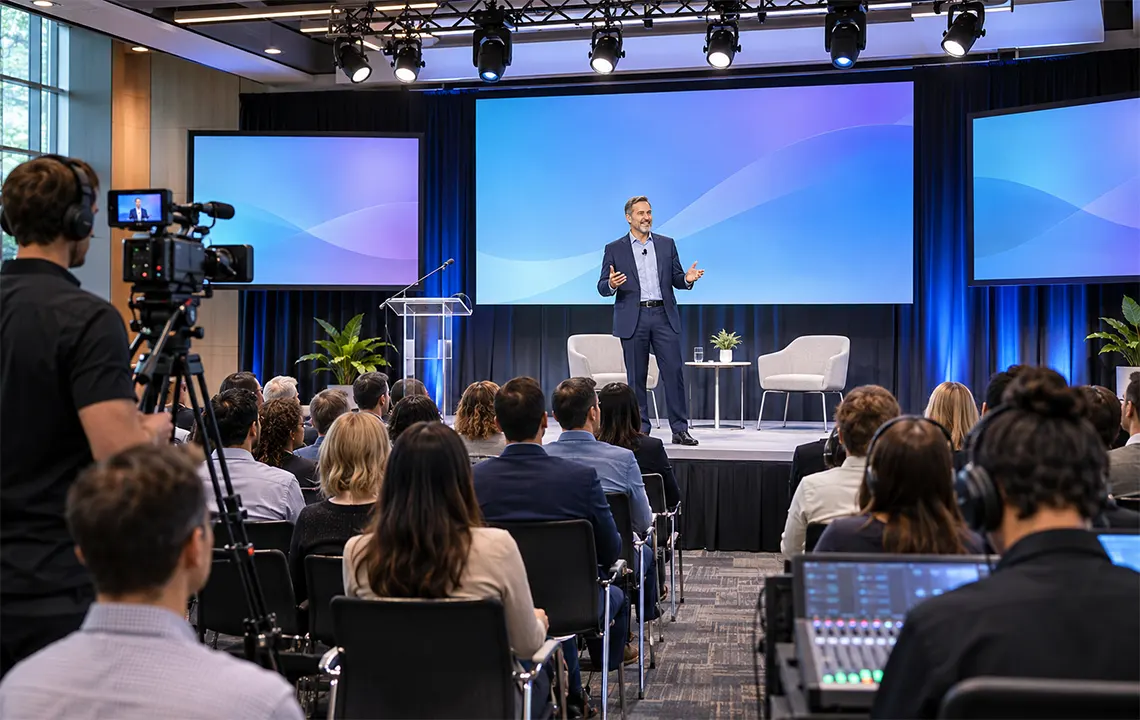
A corporate town hall brings employees, leadership, and sometimes remote teams together around important company updates. The format may look simple(a few executives, presentations, Q&A, and perhaps a livestream) but the technical requirements can become complex quickly.
Corporate town hall AV needs to support clear communication in two directions. Employees need to hear and see leadership without distraction, while presenters need reliable microphones, displays, presentation systems, and confidence that the technology will work as expected. If remote employees are joining, the production must also create an effective viewing experience for people who are not physically in the room.
The goal is not to fill a venue with equipment. It is to design an AV system around the format of the meeting, the audience, the room, and the way information will be presented.
Here is what to consider when planning AV for a corporate town hall.
What Does Corporate Town Hall AV Include?
A corporate town hall AV system usually combines several production disciplines rather than relying on a single piece of equipment.
Depending on the format, the setup may include:
- Wireless microphones for executives and presenters
- Audience microphones for Q&A
- Speakers and audio mixing
- Presentation laptops and slide switching
- Projectors, screens, monitors, or LED displays
- Confidence monitors for presenters
- Cameras for recording, livestreaming, or IMAG
- Video switching and graphics
- Stage and presenter lighting
- Livestream encoding and internet connectivity
- Remote presenter integration
- Event recording
- Technical crew and show calling
A smaller internal meeting may need only a streamlined version of this system. A large town hall with multiple presenters, hundreds of attendees, remote employees, live questions, and executive presentations may operate more like a broadcast production.
That is why it is useful to think about town hall AV as part of the broader corporate event production plan rather than creating separate audio, video, and streaming decisions.
Start With the Communication Goals of the Town Hall
Before selecting equipment, define what the meeting is supposed to accomplish.
A quarterly financial update has different AV priorities from a leadership Q&A, an organizational announcement, or an employee recognition event.
Start with questions such as:
- How many people will attend in person?
- Will employees participate remotely?
- How many presenters will speak?
- Will there be panels or interviews?
- Will employees ask questions from the audience?
- Are remote presenters joining?
- Will speakers use slides, videos, demonstrations, or other media?
- Does the organization need a recording afterward?
- Will the event include confidential or internal-only information?
- How polished should the production feel?
These answers shape almost every technical decision that follows.
For example, an executive presentation with detailed charts may require large, high-resolution displays. A conversation-driven town hall may put more emphasis on microphones, cameras, and audience Q&A. A hybrid town hall requires careful integration between the room and the online audience.
The AV plan should follow the communication format—not the other way around.
Audio Should Be the First Priority
Employees may tolerate a presentation slide that is slightly smaller than ideal. They will have a much harder time following a meeting if they cannot understand what executives are saying.
For that reason, audio is one of the most important elements of corporate town hall AV.
Choose Microphones Around the Presentation Format
Different speaking situations call for different microphones.
Lavalier microphones are useful for executives who want to speak naturally while moving around the stage. Handheld wireless microphones work well for audience questions and presenters who prefer direct control of the microphone.
Headset microphones may be appropriate when consistent voice level and hands-free operation are especially important.
For panel discussions, several panelists may each need a microphone. That creates additional requirements for wireless coordination, mixing, battery management, and monitoring.
The number of microphones should therefore be based on the run of show rather than simply the number of people listed as speakers.
If two executives will appear together, followed immediately by a four-person panel, the production team needs to know that before the equipment package is finalized.
Plan Speaker Coverage for the Room
The PA system also needs to match the venue.
The goal is even speech coverage throughout the audience area. People in the back of the room should not struggle to hear, while employees sitting near the front should not experience excessive volume.
Room shape, ceiling height, seating layout, stage position, acoustics, and audience size can all influence speaker placement.
Corporate events are particularly dependent on speech intelligibility. A system that produces plenty of volume but poor clarity is not doing its job.
Professional audio planning considers where the audience will sit and how sound will reach those positions, rather than choosing speakers based only on their power rating.
Make Presentations Easy to See
Town halls frequently include financial results, company priorities, product updates, timelines, employee recognition, videos, and other visual content.
Every employee should be able to see that material clearly.
Choose the Display Based on the Room
Common display options include:
- Projection screens
- LED video walls
- Large professional displays
- Multiple screens positioned around the room
There is no single best option.
Projection can be effective for many corporate meetings, especially when the room can support appropriate screen size, projector placement, and ambient-light control.
LED walls can provide strong brightness and flexible sizing and can work particularly well when the screen is also part of the stage design.
Large monitors may be appropriate for smaller town halls or as supplementary displays.
The most important question is whether the audience can comfortably read the actual content being presented.
A spreadsheet filled with numbers, for example, demands more usable screen size than a presentation dominated by large photographs and short headlines.
Design Slides for the Event Environment
Even an excellent display cannot fix presentation slides that were designed only for a laptop screen.
Encourage presenters to use readable typography, strong contrast, limited text, and simplified charts.
Dense slides with small labels may work during a one-on-one screen share but become difficult to interpret from the back of a meeting room.
This becomes even more important when the same presentation will be watched online, where viewers may be using laptop screens or mobile devices.
Consider Cameras Even When You Are Not Livestreaming
Cameras are not limited to webcasts.
For larger rooms, live camera feeds can be displayed on venue screens so attendees can see speakers more clearly. This technique is known as IMAG, or image magnification.
Without IMAG, employees sitting far from the stage may see presentation slides clearly but have difficulty seeing the speaker’s facial expressions.
Cameras can also provide a useful archival recording of the town hall.
How Many Cameras Does a Town Hall Need?
The answer depends on the program.
A straightforward presentation may work with one carefully positioned camera, although this provides limited flexibility.
A two-camera setup can offer a wide shot plus a tighter speaker shot, making the production feel more natural.
Additional cameras can help when the event includes:
- Multiple presentation areas
- Executive panels
- Audience Q&A
- Demonstrations
- Interviews
- Frequent movement on stage
More cameras are not automatically better. Every additional camera affects crew requirements, switching, cabling, communication, and production complexity.
The right camera plan is the simplest configuration that provides the coverage the program actually needs.
Treat a Hybrid Town Hall as Two Connected Experiences
When employees are attending remotely, the production has two audiences.
One audience is sitting in the room. The second is watching through a computer, phone, or conference platform.
Those audiences experience the meeting differently.
Someone sitting in the venue can see the full stage, hear applause naturally, observe audience reactions, and look wherever they want.
A remote viewer sees only what the production sends to them.
That means livestreaming and webcasting should be planned as part of the production from the beginning.
Remote Viewers Need a Deliberate Video Feed
A useful town hall stream may switch among:
- Speaker close-ups
- Wide stage views
- Presentation slides
- Videos
- Branded graphics
- Panel discussions
- Audience questions
- Remote speakers
Simply pointing one camera at the stage for an hour rarely creates an engaging remote experience.
Video switching allows the production team to select the most useful source at each moment.
For example, the stream might show a full-screen camera while the CEO introduces the meeting, transition to slides during a financial presentation, then move to a two-person shot during an interview.
The Streaming Audience Needs Its Own Audio Mix
Audio that sounds good in the room does not always translate directly to a livestream.
Remote viewers depend entirely on the audio feed they receive.
The stream may need a mix that balances presenters, videos, remote callers, and other program sources appropriately for online listening.
Audience reaction is another consideration. If remote viewers hear only a close microphone on the speaker, the event can sound unnaturally isolated even though hundreds of employees are in the room.
The audio workflow should therefore account for both the in-person PA and the broadcast feed.
Plan Audience Q&A Before the Event Starts
Q&A is one of the defining features of many corporate town halls—and one of the easiest parts to underestimate technically.
Decide in advance how employees will ask questions.
For an in-person audience, common approaches include handheld wireless microphones carried by staff members or microphone stands positioned in aisles.
Avoid relying on people to shout questions from their seats. The presenter may hear them, but the rest of the room, cameras, recording, and remote audience may not.
For hybrid events, also determine how online questions will enter the program.
Will employees type questions into a chat or Q&A platform? Will selected remote participants speak directly? Who will moderate the queue?
These decisions affect audio routing, video switching, staffing, and show timing.
A good town hall production treats Q&A as part of the program rather than an unplanned activity at the end.
Give Presenters the Information They Need
Corporate executives should be able to focus on communication rather than technical details.
A few carefully planned tools can help.
Confidence Monitors
A confidence monitor is a screen positioned so the presenter can see useful information without turning around to look at the main display.
Depending on the event, it may show:
- Current presentation slide
- Next slide
- Presenter notes
- Countdown timer
- Remote participants
- Program feed
This can help speakers maintain eye contact with the audience and stay oriented during the presentation.
Presentation Remotes and Slide Control
Determine who will advance slides.
Some presenters strongly prefer controlling their own deck. Others prefer to say “next” while a presentation operator handles the computer.
Either approach can work, but it should be decided during rehearsal.
The production team should also know whether speakers will be switching among PowerPoint, Keynote, videos, web demonstrations, or other applications.
Last-minute media changes can create unnecessary risk if nobody has tested the files on the show system.
Lighting Matters More When Cameras Are Involved
A room may look perfectly acceptable to the human eye while appearing dark or uneven on camera.
If the town hall includes recording, IMAG, or livestreaming, presenter lighting deserves specific attention.
The goal is not necessarily dramatic theatrical lighting. Corporate town halls usually benefit from clean, natural stage lighting that keeps speakers clearly visible.
Good lighting can also separate presenters visually from the background and help the camera system maintain consistent image quality.
Stage design, displays, scenic elements, and lighting should be considered together. A very bright LED wall behind a poorly lit presenter, for example, can create an unbalanced camera image.
Build Redundancy Around Critical Systems
Corporate town halls can include information that needs to be communicated at a specific time to a large internal audience. Technical planning should reflect that importance.
Not every component needs a duplicate, but critical points of failure deserve attention.
Depending on the production, redundancy may include:
- Backup presentation computer
- Spare microphones
- Fresh and backup batteries
- Backup cables and adapters
- Local recording
- Secondary playback options
- Backup internet connectivity for livestreaming
- Spare signal paths for critical video components
Internet redundancy is especially important when a remote audience depends on the broadcast.
A successful rehearsal does not guarantee that connectivity will remain unchanged during the entire live event. Planning alternative paths can reduce the impact of a network problem.
Use Rehearsal to Test the Entire Workflow
A technical check should test more than whether individual pieces of equipment power on.
The best rehearsal follows the actual sequence of the event.
Run through speaker entrances, microphone changes, presentations, videos, panel transitions, remote participants, Q&A, and closing remarks.
This can reveal problems that equipment testing alone will not catch.
For example:
- A presenter may walk outside the planned camera position.
- A video may contain audio nobody expected.
- A slide deck may use an unsupported font.
- A remote presenter may have poor lighting or microphone quality.
- A panel transition may require more time than planned.
- An executive may need a confidence monitor that was not originally requested.
Rehearsal is also where presenters become comfortable with the production environment.
Knowing where to stand, which camera is active, how to use the microphone, and what will appear on the screens can make the town hall feel significantly more polished.
Create a Clear Run of Show
The technical team should have a detailed timeline showing what is supposed to happen throughout the meeting.
A useful run of show might identify:
- Presenter
- Segment
- Start time
- Duration
- Microphone assignment
- Presentation file
- Video playback
- Camera requirements
- Lighting change
- Remote connection
- Q&A segment
- Special technical notes
The more complex the event, the more valuable this document becomes.
It keeps presentation, audio, video, lighting, streaming, and event management working from the same sequence.
For larger town halls, coordinating these departments through professional event production services can simplify communication and reduce last-minute technical conflicts.
A Practical Corporate Town Hall AV Checklist
Before finalizing production, confirm the major requirements:
- Audience size and seating layout
- Stage and presenter positions
- Number and type of microphones
- Speaker system and coverage
- Presentation sources
- Screen or display requirements
- Camera coverage
- Recording requirements
- Livestream or webcast platform
- Remote presenters
- Audience Q&A method
- Confidence monitors
- Stage lighting
- Internet requirements
- Backup systems
- Technical crew
- Presentation file deadline
- Rehearsal schedule
- Run of show
You do not necessarily need every item on this list for every town hall. The purpose is to identify requirements early enough that they can be designed into the system instead of solved during the event.
Build the AV System Around the Conversation
The best corporate town hall AV setups do not draw attention to the technology.
Employees hear every speaker clearly. Presentations are easy to read. Remote participants can follow the conversation. Executives move through the program without worrying about microphones or computers. Questions from employees become part of the meeting instead of technical interruptions.
Achieving that experience requires more than choosing individual pieces of audio and PA equipment. Audio, displays, cameras, lighting, presentations, streaming, networking, and show operation all need to work as one coordinated system.
If you are planning a corporate town hall and need support with AV equipment, livestreaming, recording, or full event production, Megahertz Productions can help you develop a technical setup around your venue, program, audience, and presentation requirements.