When planning an event, audio equipment is one of those things that is easy to underestimate. A microphone may look like a microphone, a speaker may look like a speaker, and a mixer can seem like just another piece of equipment sitting on a production table. But once an event begins, the quality of the audio system can make the difference between an engaging experience and a frustrating one.
Whether you are organizing a corporate meeting, conference, product launch, live presentation, hybrid event, livestream, or large-scale production, choosing the right audio equipment rental provider is about much more than finding a list of equipment at the lowest price.
You need equipment that fits the venue, the audience, the program, and the production requirements. More importantly, you need a rental partner that understands how all those pieces work together.
At Megahertz Productions, we approach audio as part of the complete event experience. The goal is not simply to provide microphones and speakers. It is to create a reliable audio environment where presenters can be heard clearly, music sounds balanced, remote participants stay connected, and your production team can focus on the event rather than troubleshooting technical problems.
So, what should you actually look for when renting audio equipment?
Let’s break it down.
Start With Your Event’s Audio Requirements
Before searching for an audio equipment rental company, start by defining what your event actually needs.
There is no universal audio package that works perfectly for every event. A small executive meeting may require only a few wireless microphones and compact speakers, while a multi-room conference may require several independent audio systems, digital mixing, stage monitoring, recording, and integration with a livestream.
Consider questions such as:
- How many people will attend?
- How large is the venue?
- Is the event indoors or outdoors?
- How many speakers or presenters will be on stage?
- Will there be audience Q&A?
- Will video be part of the production?
- Will people participate remotely?
- Does the event require livestreaming or webcasting?
- Will music, videos, or playback tracks be used?
- Does the event need audio recording?
- Are multiple rooms involved?
Answering these questions early makes it much easier to determine what equipment is actually necessary.
Think About the Audience First
A useful rule is to plan audio around the people who need to hear it.
A system that sounds excellent from the front of a room but becomes difficult to understand toward the back is not doing its job. Likewise, a microphone setup that works for one presenter may become inconvenient when ten speakers need to move around the stage.
Good event audio should feel almost invisible to the audience. People should be able to focus on the speaker, presentation, or performance without thinking about whether they can hear properly.
Choose the Right Microphones
Microphones are often the first thing people think about when renting audio equipment, but choosing the right type matters more than simply choosing a recognizable brand.
Different microphones are designed for different situations.
Wireless Handheld Microphones
Wireless handheld microphones are flexible and practical for presenters, panel discussions, interviews, and audience participation. They allow speakers to move freely while maintaining a consistent connection to the sound system.
They are particularly useful when a microphone needs to be passed between multiple people.
Lavalier Microphones
Lavalier microphones are small microphones that attach to a speaker’s clothing. They are popular for presentations, conferences, training sessions, and corporate events because they allow presenters to speak naturally without holding a microphone.
However, placement is important. Clothing movement, jewelry, and poor positioning can introduce unwanted noise, so professional setup and testing are essential.
Headset Microphones
For presenters who move around frequently or need both hands free, headset microphones can be an excellent option.
They are especially useful for energetic presentations, demonstrations, workshops, and performances where consistent microphone positioning is important.
Gooseneck and Podium Microphones
If presenters will remain at a lectern or podium, a gooseneck microphone may be the simplest solution. These microphones provide a clean and professional setup without requiring the speaker to wear a microphone.
The right choice depends on the format of the event, not simply personal preference.
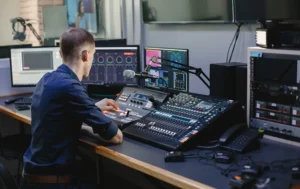
Don’t Overlook the Audio Mixer
The mixer is essentially the control center of an audio system.
It allows the production team to manage different audio sources, adjust levels, route signals, control microphones, and create the appropriate mix for the audience and other destinations.
For a simple event, a compact mixer may be sufficient. More complex productions may require a digital mixing console with multiple inputs, advanced processing, routing capabilities, and remote control.
When discussing an audio equipment rental, ask the provider how the mixer will be configured for your specific event.
You do not necessarily need the biggest or most sophisticated console available. You need one that has enough inputs, outputs, processing, and routing flexibility for your production.
A professional audio partner should be able to explain why a particular mixer is appropriate rather than simply adding expensive equipment to the rental package.
Pay Attention to Speaker Coverage
A powerful speaker does not automatically mean good event audio.
The goal of a professional sound system is even and intelligible coverage throughout the listening area. If the people in the first few rows feel like the speakers are too loud while people in the back struggle to understand the presenter, the system has not been properly designed.
Speaker selection depends on factors such as:
- Room dimensions
- Audience size
- Ceiling height
- Stage location
- Seating arrangement
- Indoor or outdoor environment
- Ambient noise
- Type of event
- Required sound pressure levels
For some events, a pair of loudspeakers may be enough. Larger productions may require additional speakers, subwoofers, delay speakers, monitors, or distributed audio systems.
This is one of the main reasons professional guidance matters when renting audio equipment.
Ask About Wireless Frequency Management
Wireless microphones are incredibly convenient, but they also require careful planning.
When several wireless devices operate simultaneously, frequency coordination becomes important. Poorly coordinated systems can lead to interference, dropouts, noise, or unexpected microphone failures during the event.
This is especially important for conferences and productions involving multiple presenters.
A professional AV rental company should understand wireless frequency coordination and know how to prepare the system for the environment where it will be used.
Don’t hesitate to ask how the rental provider handles wireless frequencies, interference, and backup planning.
Check the Condition and Reliability of the Equipment
Audio equipment can look perfectly fine from the outside while still having problems that become obvious only during an event.
A microphone with a damaged connector, a cable with intermittent signal loss, or a wireless system with unreliable batteries can create problems at exactly the wrong moment.
Before renting, ask whether equipment is:
- Professionally maintained
- Tested before delivery
- Inspected between rentals
- Properly stored
- Supported by backup equipment when appropriate
Reliability is often more valuable than having access to the newest equipment on the market.
The latest microphone will not improve your event if nobody has tested it before showtime.
Make Sure the Rental Includes the Right Accessories
One common mistake when renting audio equipment is focusing on the major pieces while forgetting the smaller components that make the system work.
A complete audio setup may require:
- Microphone stands
- XLR cables
- DI boxes
- Power distribution
- Wireless microphone batteries
- Audio adapters
- Signal splitters
- Stage monitors
- Direct boxes
- Extension cables
- Cable management
- Cases and transport equipment
Ask your rental provider whether these items are included in the proposed setup.
A good rental quote should make it clear what is included and what is not.
Consider Audio for Livestreaming and Webcasting
Modern events increasingly have two audiences: the people physically in the room and the people watching remotely.
That changes the audio requirements.
The sound that works for an audience inside a venue is not automatically the sound that works for a livestream.
For example, a room may sound perfectly balanced in person while remote viewers hear excessive room noise, inconsistent microphone levels, or music that overwhelms the presenter.
A professional livestreaming and webcasting production may require dedicated audio feeds, signal routing, mixing for the online audience, and integration between the AV system and streaming platform.
This is why audio should be considered early when planning a hybrid or online event rather than added as an afterthought.
If your event includes a remote audience, it can also be useful to discuss your audio requirements alongside your broader livestreaming and webcasting services.
Ask How Audio Will Integrate With Video
Audio and video are no longer separate parts of many events.
Presentations, keynote sessions, product demonstrations, interviews, video playback, livestreams, and webcasts often require audio and video systems to work together seamlessly.
For example, a presentation video may need to send audio through the main sound system. A panel discussion may need microphones routed to both the room and a streaming encoder. A remote presenter may need to hear the room while avoiding an echo loop.
These situations require careful signal routing.
When evaluating an AV rental company, look for a provider that understands the complete production workflow rather than treating audio as an isolated rental category.
Ask About On-Site Technical Support
Equipment rental is one thing. Technical production support is another.
For important events, having experienced technicians available can provide significant peace of mind.
A technician can monitor audio levels, respond to unexpected problems, coordinate microphones, troubleshoot connections, and make adjustments as the event changes.
This becomes especially valuable for events with multiple speakers, live performances, complex presentations, or livestreaming.
When comparing rental providers, ask:
- Is delivery included?
- Is setup available?
- Will the equipment be tested on-site?
- Is a technician available during the event?
- Is strike and pickup included?
- What happens if equipment fails?
The answers can reveal a lot about the level of service you are actually purchasing.
Don’t Choose Audio Equipment Based on Price Alone
Budget matters. But the cheapest quote is not necessarily the most affordable option.
Imagine saving money on the initial rental only to discover that the system does not provide adequate coverage, microphones are missing, or technical support is not included. Fixing those problems at the last minute can cost significantly more than choosing the right production partner from the beginning.
Instead of comparing rental prices alone, compare the complete value of each proposal.
Look at:
- Equipment quality
- System design
- Technical expertise
- Setup and teardown
- On-site support
- Backup planning
- Communication
- Experience with similar events
The right question is not simply, “How much does this equipment cost?”
It is, “What am I getting for the investment, and how confident am I that it will work when the event begins?”
Read More: The Real Cost of Cheap AV Rental
Ask About Backup Equipment and Contingency Planning
Even well-maintained equipment can experience unexpected problems.
Professional event production is therefore about preparation as much as technology.
Depending on the scale and importance of your event, contingency planning might include backup microphones, spare cables, additional batteries, redundant signal paths, backup playback options, or replacement equipment.
Not every event needs a complete duplicate audio system. But every important event should have a plan for the most likely points of failure.
Ask your AV partner what happens if a microphone stops working, a cable fails, or another unexpected issue occurs.
The best time to answer that question is before the audience arrives.
Look for an Audio Rental Partner, Not Just a Rental Catalog
There is a major difference between renting equipment and working with an experienced AV production company.
A catalog can tell you what equipment is available.
A production partner can help you determine what you actually need.
At Megahertz Productions, we believe successful event audio begins with understanding the event itself. The room, presenters, audience, content, schedule, and production goals all influence the technical design.
That approach helps avoid both extremes: underbuilding the system and spending money on equipment that provides little practical benefit.
Whether you need a straightforward conference audio setup or a complete AV production with video, livestreaming, and webcasting, the goal should always be the same: dependable technology that supports the experience rather than distracting from it.
You can explore the broader range of AV rental and production services available from Megahertz Productions when planning your next event.
Create an Audio Checklist Before You Rent
Before finalizing an audio equipment rental, use this quick checklist:
Event Details
- What type of event are you producing?
- How many people will attend?
- What is the venue layout?
- How many speakers will be on stage?
- Will presenters move around?
- Are there multiple rooms?
Equipment
- What type and number of microphones are needed?
- What mixer is appropriate?
- How many speakers are required?
- Are monitors necessary?
- Are DI boxes or other interfaces required?
- Are cables, stands, adapters, and batteries included?
Production
- Will audio be recorded?
- Will the event be livestreamed?
- Does the online audience require a separate audio mix?
- Will video playback be used?
- Are remote speakers participating?
Support
- Is delivery included?
- Is setup included?
- Will the system be tested?
- Is an on-site technician available?
- Is backup equipment available?
- Who should you contact if something goes wrong?
Having clear answers to these questions can make the rental process dramatically easier.
The Best Audio System Is the One Your Audience Doesn’t Notice
Great event audio rarely receives applause.
People notice a keynote speaker. They notice a compelling presentation. They notice an impressive stage design. But they usually don’t stop to think about the microphone that made every word intelligible or the speaker system that delivered consistent sound throughout the room.
And that’s exactly what professional audio should do.
It should disappear into the experience.
When renting audio equipment, look beyond individual products and focus on the complete system: microphones, speakers, mixing, signal routing, wireless coordination, venue coverage, technical support, and contingency planning.
Most importantly, choose an AV partner that understands how those pieces work together.
At Megahertz Productions, we approach audio as one part of a larger production ecosystem. From corporate meetings and conferences to livestreams, webcasts, and full-scale AV productions, thoughtful planning helps ensure that technology works quietly in the background while your message takes center stage.
Because when everyone can hear clearly, nobody has to think about the sound—and that is often the clearest sign that the audio production has been done right.