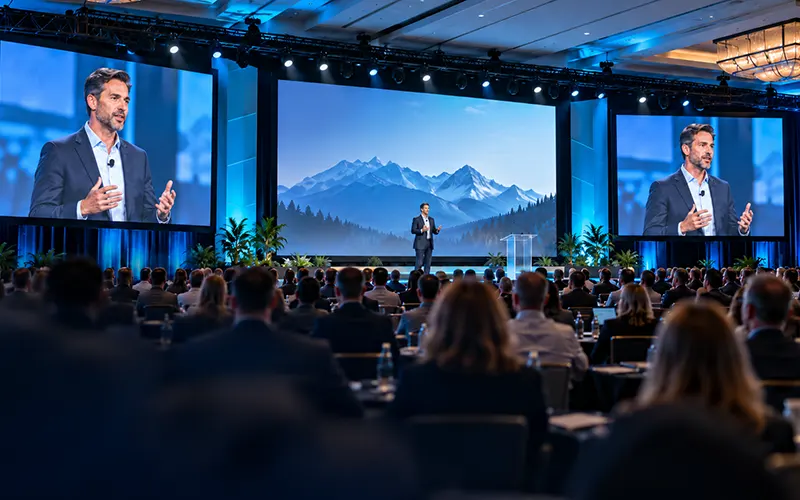
At a conference, being able to hear the presenter is only part of the audience experience. Attendees also need to see the person speaking clearly enough to follow facial expressions, gestures, demonstrations, and interactions on stage.
That becomes difficult as rooms get deeper, stages get farther away, and audiences spread across wider seating areas.
This is where IMAG for conferences becomes valuable. IMAG (short for image magnification) uses live cameras to capture presenters and display those camera feeds on large screens inside the venue. Instead of asking someone in the back of the room to watch a small figure on a distant stage, IMAG gives them a close-up view in real time.
However, not every conference automatically needs live camera screens. Adding IMAG affects the camera package, video switching, screen design, lighting, crew, stage layout, and technical schedule. The right question is not simply, “How many attendees do we have?” It is, “Will everyone in the room be able to see what matters without camera magnification?”
Here is how to make that decision.
What Is IMAG at a Conference?
IMAG is a live video system designed primarily for the audience that is physically inside the event space.
A camera captures the presenter, panelist, interviewer, performer, or demonstration taking place on stage. That signal travels through the conference video system, where a video operator can select the appropriate camera and send the resulting live image to one or more audience-facing screens.
The purpose is straightforward: make important stage activity visually accessible to people who cannot see it clearly with their own eyes.
IMAG is different from simply putting presentation slides on a screen. It is also different from a livestream.
Presentation screens might show PowerPoint slides, videos, sponsor graphics, or schedules. A livestream sends a produced program to viewers outside the room. IMAG brings live camera images back into the room so in-person attendees can better follow what is happening on stage.
The same cameras may sometimes support both IMAG and a livestream, but the two outputs do not necessarily need to look the same.
When Does a Conference Need IMAG?
There is no universal attendance number at which IMAG suddenly becomes necessary. Room geometry matters just as much as audience size.
A conference with several hundred people in a shallow, wide ballroom may have better stage visibility than a smaller audience seated in a long, narrow room. Ceiling height, stage elevation, screen position, seating layout, and scenic elements can all change the result.
For broader conference planning, these visual decisions should be considered alongside audio, presentation playback, lighting, staging, and speaker requirements as part of the overall conference AV production plan.
Several situations make IMAG especially useful.
The Audience Extends Far From the Stage
Audience depth is one of the clearest reasons to use IMAG.
A person sitting near the stage can usually see a speaker’s expression and body language without assistance. Someone much farther back may be able to identify the speaker but miss the visual details that make a presentation feel personal.
That matters during executive keynotes, interviews, fireside chats, award presentations, panel discussions, and other sessions in which the person on stage is part of the content.
The farther the audience extends from the stage, the more useful live speaker close-ups become.
Facial Expressions and Body Language Matter
Not every presentation depends equally on seeing the presenter.
If a speaker is primarily narrating highly visual slides, the presentation graphics may deserve most of the available screen space. But if the session is built around storytelling, conversation, leadership communication, or an emotional message, seeing facial expressions can add important context.
Consider a CEO delivering a company update. Attendees may technically be able to see the person standing on stage, but if much of the room cannot see the speaker’s face, the experience can feel surprisingly disconnected.
IMAG closes that visual distance.
Your Program Includes Panels or Interviews
Panels create another strong use case.
From farther seats, a row of several panelists can appear almost interchangeable. When the moderator asks a question and one panelist responds, attendees may need a moment to determine who is speaking.
Camera coverage lets the video operator cut to the active speaker. That gives the room an immediate visual cue and makes the conversation easier to follow.
The same principle applies to fireside chats, interviews, award presentations, and sessions that frequently move attention between multiple people.
Presenters Demonstrate Physical Objects or Actions
Some conference sessions involve more than speech.
A presenter may hold up a product, demonstrate equipment, perform a procedure, show a prototype, or interact with something on a table. These details can be difficult or impossible to see from the middle or back of the room.
The camera can become the audience’s closer viewpoint.
Depending on the demonstration, that might mean a conventional camera shot, a close-up camera dedicated to the demonstration area, or another specialized video source integrated into the main system.
The Venue Creates Difficult Sightlines
Distance is not the only visibility problem.
Wide rooms can create steep viewing angles. Columns, scenic elements, lighting positions, staging, or other structures may partially obstruct views. A very low stage can also make presenters difficult to see once rows of people are seated in front of one another.
In these situations, adding correctly positioned displays may improve the experience more effectively than simply making the central presentation screen larger.
That is why screen planning should be based on audience geometry rather than screen size alone. Our LED wall size guide discusses viewing distance, side screens, audience depth, and other factors that affect large-format display decisions.
When You May Not Need IMAG
IMAG can improve a conference, but additional production technology is not automatically better.
In a small meeting room where every attendee has a clear view of the presenter, live cameras may add complexity without solving a meaningful problem. The audience may naturally prefer looking directly at the person on stage rather than watching that same person on a nearby screen.
Screen priorities also matter.
Suppose a technical conference depends heavily on detailed charts, code, dashboards, or product interfaces. If the venue has limited display area, using most of that space for a large image of the speaker could make the actual presentation material harder to read.
In that situation, the better design may emphasize presentation content and use IMAG selectively.
Budget is another consideration. Real IMAG production requires more than adding a camera. Cameras need appropriate placement and lenses, video signals need routing, shots need to be selected, and someone needs to operate the system during the program. Depending on the event, additional crew, lighting, communications, cabling, processing, and rehearsal time may also be required.
The objective should always be to solve an audience problem—not to add cameras simply because they are available.
A Better Way to Decide Whether You Need Live Camera Screens
Instead of starting with attendance, start with the audience’s actual viewing experience.
Stand where the farthest attendee will sit and look toward the stage.
Can you clearly identify the person speaking? Can you comfortably see the speaker’s face? If two people are having a conversation, can you quickly tell which one is talking? If a presenter holds up an object, can you see what they are showing? Would watching the speaker on a nearby screen be easier than watching the stage directly?
Then repeat the exercise from seats at the sides of the room.
This simple sightline test often provides more useful information than audience count alone.
It should ideally happen while the room, stage, screens, and seating are still being planned. Once the stage design and seating plan are locked, fixing poor visibility can become much more difficult.
Choosing the Right Screen Layout for Conference IMAG
Deciding to use IMAG is only the first step. The next question is where the live image should appear.
There is no single layout that fits every conference.
Dedicated Side Screens
A familiar general-session configuration places presentation content on a main center screen while side screens show live cameras.
This has an important advantage: the audience can see the speaker and presentation simultaneously without forcing both sources into a small split-screen layout.
Side screens can also improve visibility for guests sitting far from the centerline.
In some rooms, projection may be an effective way to create large image surfaces. Other designs may benefit from modular LED wall rental options, particularly when screen brightness, flexible dimensions, stage integration, or available projection space becomes a factor.
A Single Large Screen
Smaller or more visually streamlined productions may use one primary display for everything.
The video operator can switch that display between presentation slides, video playback, IMAG, branding, and other sources.
This can work well when the show is carefully programmed. The limitation is that the audience may sometimes need both the presentation and the speaker at the same time.
If switching to a full-screen camera removes an important chart from view, for example, the screen strategy may need to change.
Picture-in-Picture or Multi-Source Layouts
Another option is to display the presenter and presentation simultaneously.
The speaker may appear beside the slides, within a picture-in-picture window, or inside a wider branded canvas containing several content areas.
This approach can be effective, but every additional element reduces the amount of screen area available to the others.
A layout that looks attractive on a designer’s monitor may make slide text too small for someone sitting at the back of a ballroom.
Content layouts therefore need to be evaluated at realistic viewing distances rather than judged only from the control position.
Repeater Screens
Very deep rooms may benefit from screens positioned farther back in the audience.
These repeater displays help people seated beyond the effective viewing range of the front screens.
They can be particularly useful when architectural constraints prevent the front display system from becoming large enough to serve the entire room comfortably.
How Many Cameras Does Conference IMAG Need?
A basic IMAG system can technically use one camera, but camera count changes what the production can accomplish.
A single camera can provide a useful continuous view of a presenter. It may be enough for a straightforward lecture or simple keynote where the speaker remains in a predictable area.
Once the program becomes more dynamic, additional cameras become valuable.
With multiple cameras, one operator can frame a speaker while another shot is already prepared. The director or video switcher operator can move between them without showing the audience every zoom, pan, refocus, or framing adjustment.
A keynote might use one tighter speaker shot and one wider stage view. A panel may benefit from a wide shot of the entire group plus tighter angles for individual participants. Audience Q&A may require a camera that can cover attendees asking questions.
Camera quantity should therefore be based on the program, not an arbitrary package size.
The conference agenda is one of the most useful tools for determining the correct system. A detailed AV production brief can help communicate which sessions involve keynotes, panels, demonstrations, remote speakers, video playback, recording, and other requirements that affect camera planning.
Camera Placement Matters as Much as Camera Count
Adding more cameras does not help if they are placed poorly.
A primary camera is often positioned near the visual centerline so the speaker appears to be addressing the audience naturally. Place that camera too far to one side and viewers on the screen may feel as though the presenter is constantly looking away from them.
At the same time, cameras cannot interfere with attendee sightlines or occupy seating areas without consideration.
Camera position also affects lens selection. A camera located far from the stage needs sufficient optical reach to create stable close-up shots. A camera positioned too close may create distracting angles or become visually intrusive.
Panels, lecterns, presentation screens, stage entrances, confidence monitors, and presenter movement all need to be considered before final camera positions are chosen.
Live Switching Is What Makes IMAG Feel Intentional
Putting camera feeds on large screens is only part of the job. Someone needs to decide what the audience sees and when.
During a panel, that could mean cutting from the moderator to the person answering the question. During a keynote, it might mean moving between a medium shot, a tighter shot, and presentation content. During an award segment, the appropriate view could change quickly as people enter the stage, shake hands, accept an award, and pose for a photo.
Good switching should support the audience’s attention rather than compete with it.
Constant cutting can become distracting. Holding an unhelpful shot for too long can be equally frustrating.
The operator needs to understand the program, anticipate transitions, and communicate with camera operators when more than one camera is involved. This is one reason general sessions often require a coordinated production approach rather than treating video as an isolated equipment rental. Our guide to conference general sessions and breakout rooms explains how video, audio, lighting, presentation playback, staging, and show control come together in the main conference room.
Stage Lighting Becomes More Important When Cameras Are Added
A stage can look acceptable to people in the room while producing an underwhelming camera image.
Cameras respond differently to light than human vision. Faces need enough controlled illumination for the image to look clear and natural, and lighting should remain reasonably consistent as speakers move through expected presentation positions.
The relationship between stage lighting and display brightness also matters. A large, bright screen may visually dominate a poorly lit presenter.
This is why camera coverage and lighting should be planned together rather than adding IMAG after the lighting design has already been finalized.
For hybrid conferences, the same consideration becomes even more important because the camera images may also be used by the remote audience.
IMAG Should Have Very Low Delay
Conference IMAG has one requirement that can easily be overlooked: the audience can see the real presenter and the screen at the same time.
That makes video delay much more noticeable.
If someone watches a presenter move on stage and then sees the same movement appear on the screen noticeably later, the experience feels disconnected. Speech and lip movement can also appear unnatural if video timing is not managed correctly.
For that reason, the live signal path used for in-room IMAG should be designed for responsive real-time production. A streaming workflow built primarily for internet distribution should not automatically be assumed to be the correct signal path for audience-facing IMAG screens.
The room feed, recording feed, and livestream may share many sources while still requiring different processing and routing.
IMAG and Livestreaming Are Related, but They Are Not the Same Production
If a conference is also livestreamed, it can be tempting to assume that one video output should simply go everywhere.
Sometimes that works. Often, each audience benefits from a different program.
Someone sitting in the venue can already see the stage, hear room reactions, and read the primary displays. The IMAG feed mainly needs to help that person see stage activity more clearly.
An online viewer has none of that context.
The livestream may therefore need presentation slides inserted directly into the video, lower-third speaker names, remote participants, branded transitions, recorded videos, and wider establishing shots that make the program understandable without being physically present.
Both audiences may use the same cameras, but the optimal switching decisions are not always identical.
Planning those requirements together through an integrated event production approach can prevent the in-room video, stage displays, recording, and online program from competing with one another.
Common IMAG Mistakes to Avoid
One of the most common mistakes is making the decision too late. If live cameras are introduced after staging, seating, lighting, and screen positions have already been finalized, there may be limited options for good camera locations and sightlines.
Another mistake is concentrating only on camera specifications. The best camera in the room cannot compensate for poor lighting, an inadequate lens position, badly placed screens, or a production layout that leaves the operator unable to follow the program.
Screen design can create problems as well. If the presentation, speaker close-up, sponsor logo, event branding, and multiple other elements are squeezed onto the same display, each source may become too small to be useful.
Conference planners should also avoid treating every session identically. A keynote, six-person panel, software demonstration, award presentation, and audience Q&A create very different camera demands.
Finally, rehearsal should not be limited to checking whether a camera turns on. It is an opportunity to verify presenter positions, camera framing, slide layouts, switching cues, screen content, lighting, and transitions before attendees enter the room.
What to Tell Your AV Team When Planning IMAG
The more clearly the production team understands the program, the more accurately the system can be designed.
Before finalizing conference IMAG, be prepared to answer:
- What are the dimensions and seating layout of the main room?
- How far is the farthest attendee from the stage?
- What screens or LED